
Tutorial 2 · about 15 minutes
Slope stability of a road cutting
Build a 12 m high cutting at 35° in silty sand, find its factor of safety with groundwater 2 m below the surface, then see what a dry slope gives.
- Terra Invite Beta 9
- Windows 10 or 11
- Each run takes about 2 s
Steps
Before you start
- Terra Invite Beta 9 or later on a Windows 10 or 11 computer, with your beta licence imported (in Terra: Help › Licence…). Compute needs the licence.
- About 15 minutes. You need no slope-stability experience: every value is in the tables below.
You will learn to
- open the slope model and set its height and angle
- enter the soil strength and the groundwater level
- fix the base and sides, build the mesh and compute
- read the factor of safety and the critical slip circle, and compare a dry slope
Step 1: Open the slope model
Start Terra Invite Beta 9. In the menu bar, click Examples › Slope stability · 2D.
If Terra asks about unsaved changes, click Discard, or Save to keep your earlier work.
The stage strip along the top runs Geometry › Materials › Physics › Conditions › Mesh › Run › Results. You work through it from left to right; the dark button at the top right of the Details panel always takes you to the next stage.
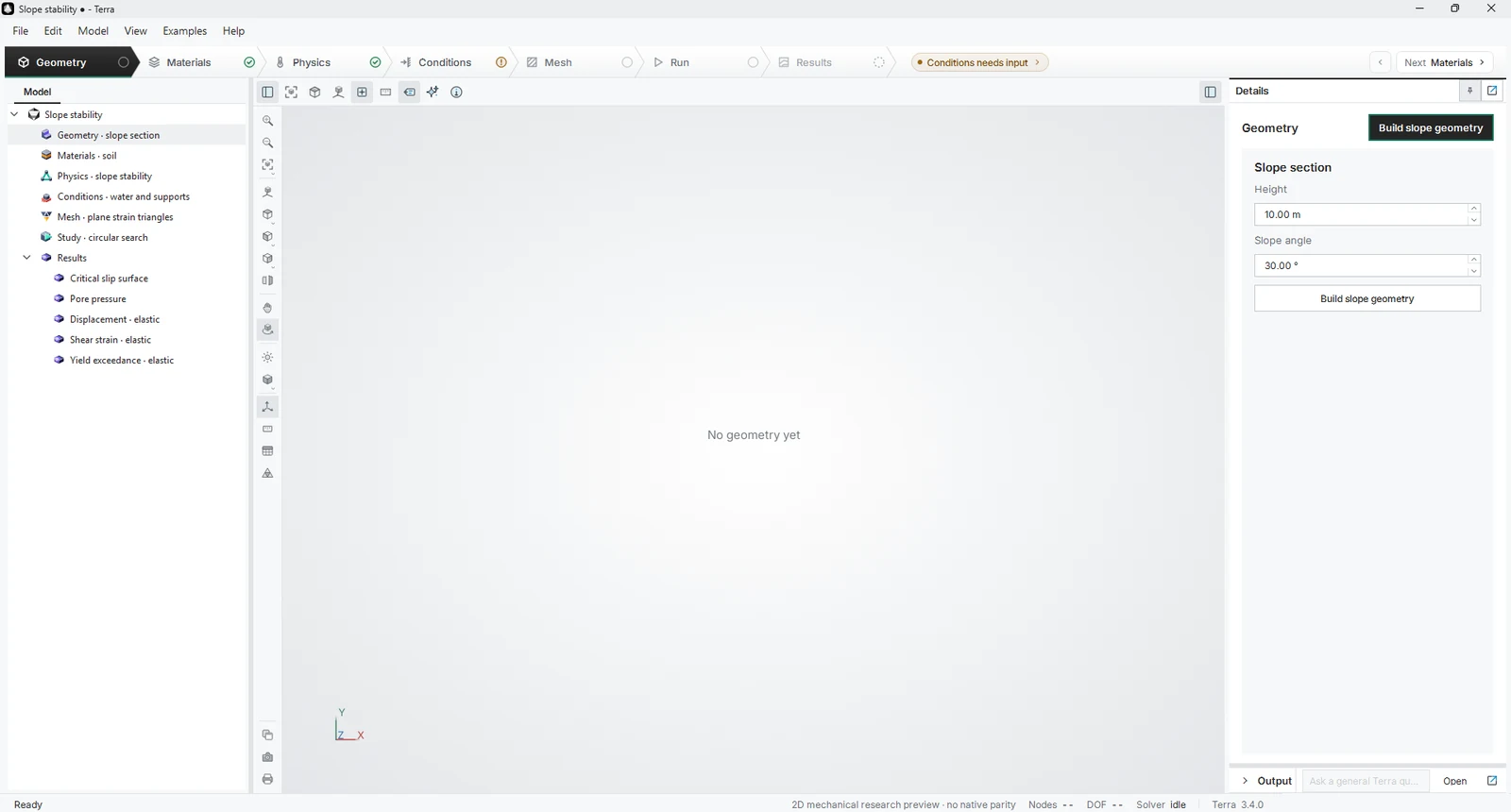
Open the whole Terra window (new tab) Check: The title bar reads Slope stability and the Details panel shows Slope section with Height and Slope angle.
Step 2: Set the height and angle
In Slope section, set the two values below. Click in a field, select its value, type the new value and press Tab.
Field Value Height 12 m Slope angle 35° Click Build slope geometry.
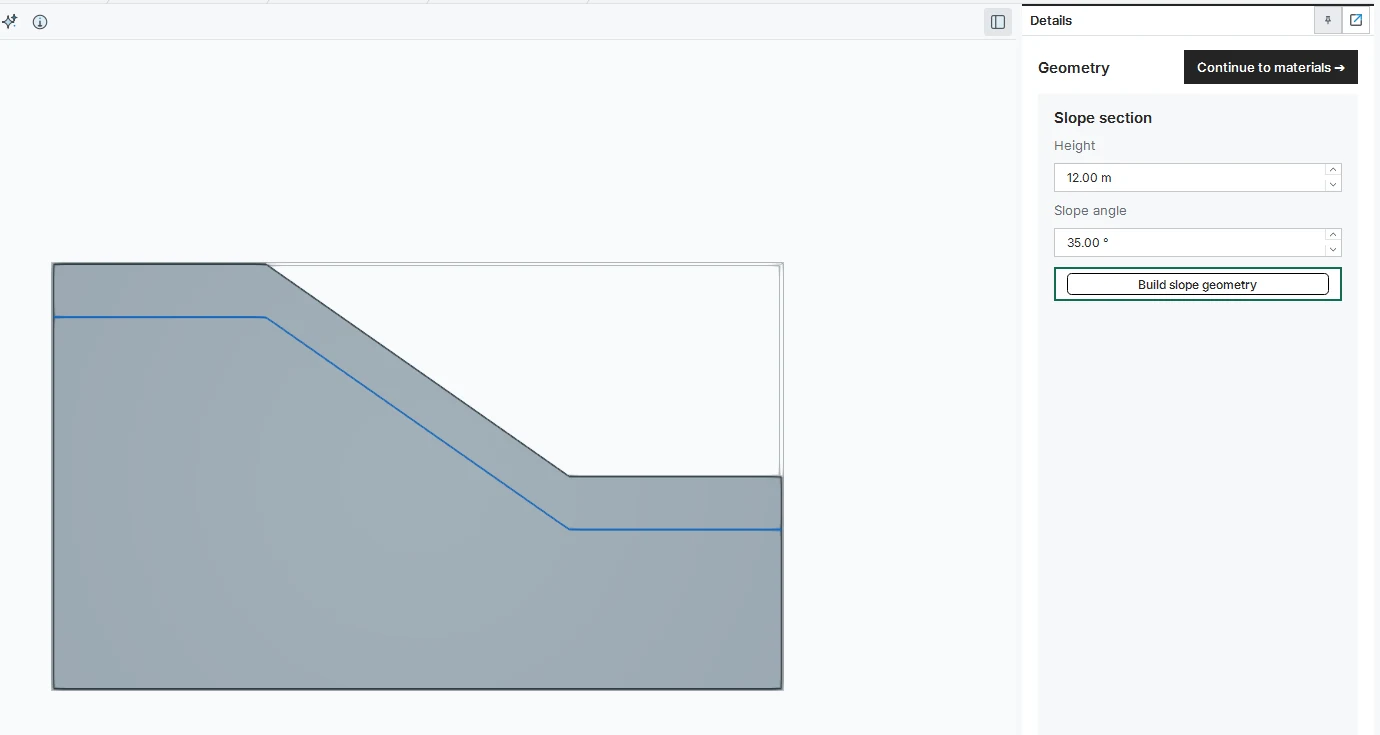
Open the whole Terra window (new tab) Check: The view shows the cross-section with a blue groundwater line, and the top-right button now reads Continue to materials →.
Step 3: Enter the soil
Click Continue to materials →. Under Homogeneous soil · effective stress, set:
Field Value Cohesion c′ 8 kPa Friction angle φ′ 30° Bulk unit weight 19 kN/m³ (already set) Leave Elastic modulus E and Poisson ratio as they are. They feed only the elastic views, not the factor of safety.
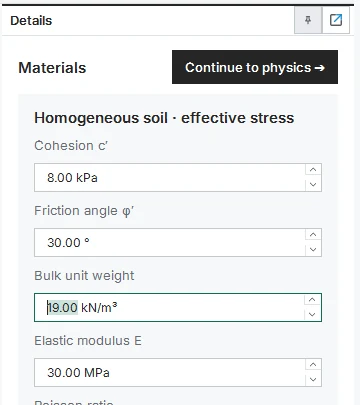
Open the whole Terra window (new tab) Check: Cohesion reads 8.00 kPa and Friction angle reads 30.00 °.
Step 4: Set groundwater and supports
Click Continue to physics →. Physics needs no input: it names the method, Bishop simplified · circular slip search · self-weight. Click Continue to conditions → and set:
Field Value Water condition Prescribed groundwater Water depth below ground 2 m Base Fixed · ux = uy = 0 Left and right sides Roller · ux = 0 If you cannot see Base and Left and right sides under Mechanical supports, scroll down in the card.
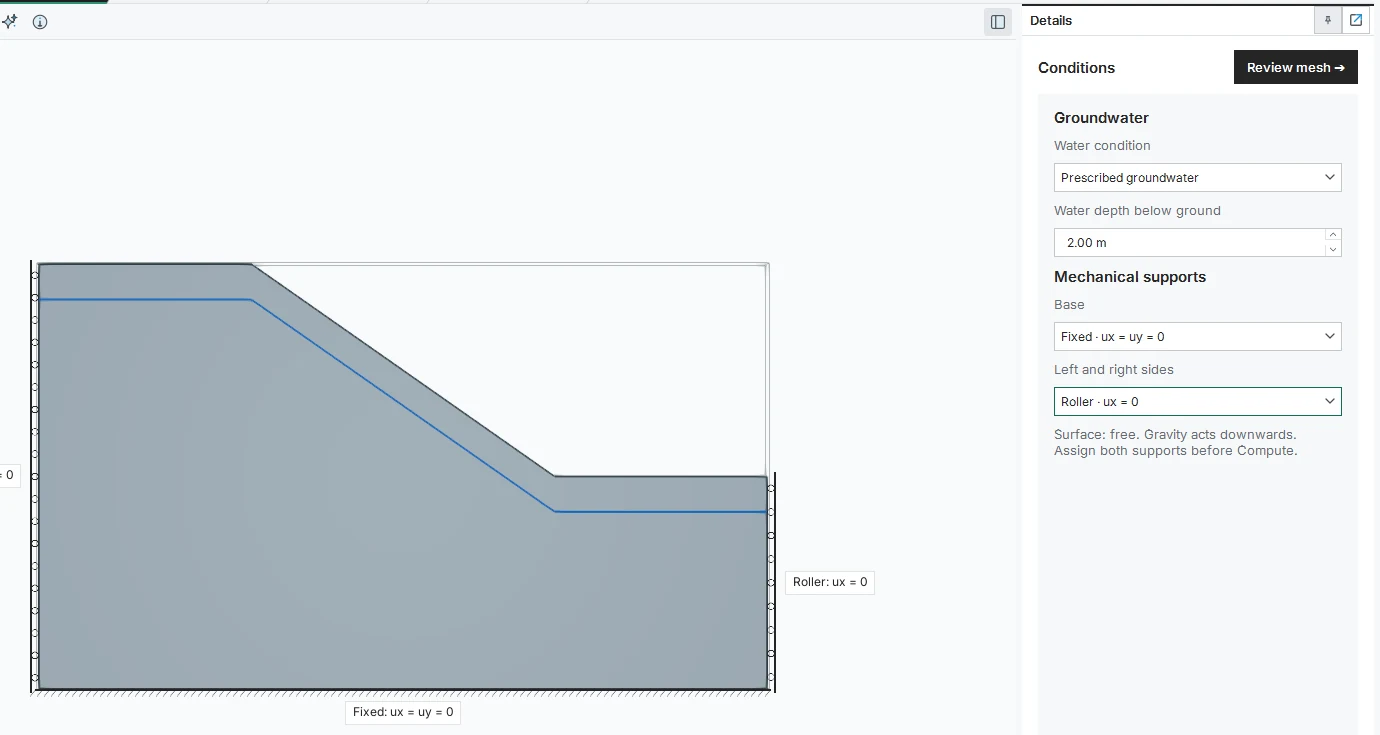
Open the whole Terra window (new tab) Check: Conditions in the stage strip has a green tick, and the view shows Fixed: ux = uy = 0 under the base and Roller: ux = 0 on both sides.
Step 5: Build the mesh
Click Review mesh →. Keep Horizontal subdivisions 44 and Vertical subdivisions 24, then click Build mesh.
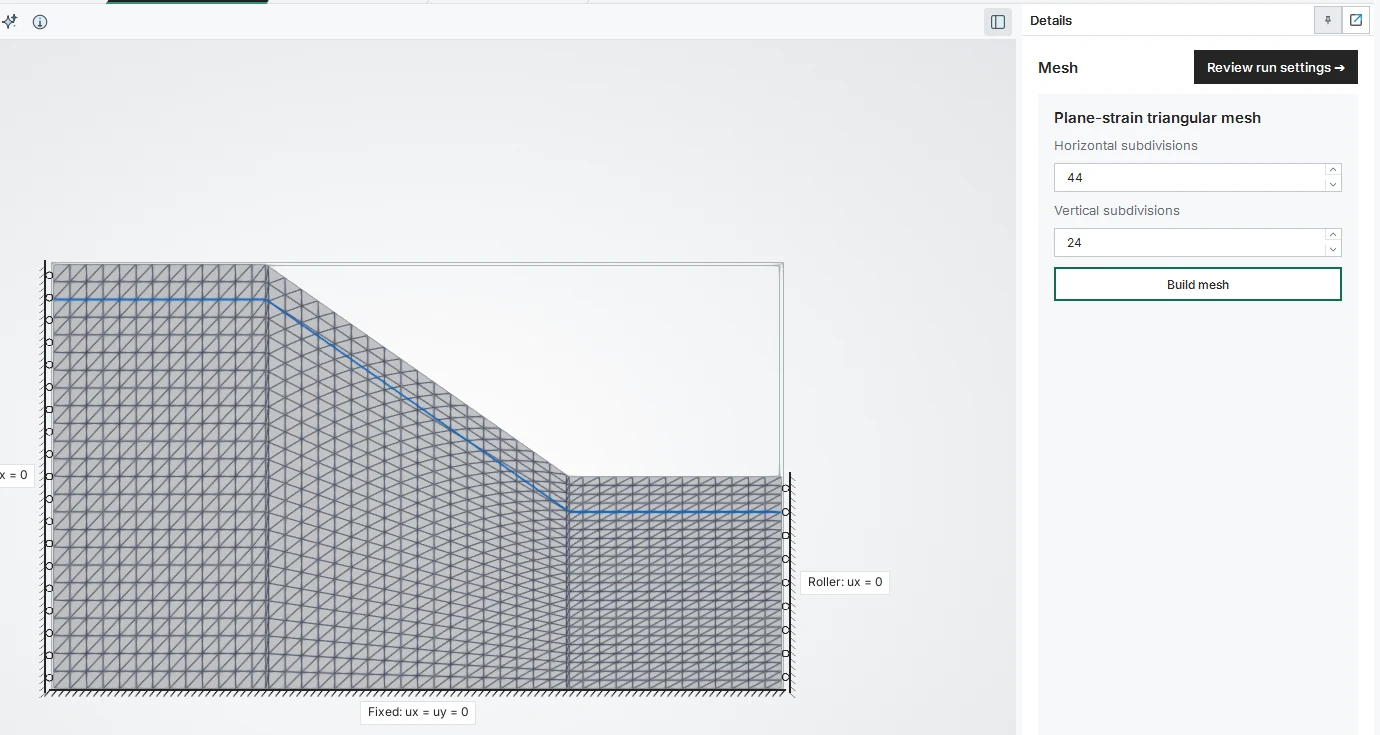
Open the whole Terra window (new tab) Check: The status bar at the bottom shows Nodes 1,175 and DOF 2,350.
Step 6: Compute the factor of safety
Click Review run settings →. Keep Slices per circle 60 and Grid per search dimension 14, then click Compute. The search takes about 2 seconds.
Terra tries many circular slip surfaces and keeps the one with the lowest factor of safety. A value close to 1 means the slope is close to failure; many design guides ask for about 1.3 to 1.5 for a permanent slope.
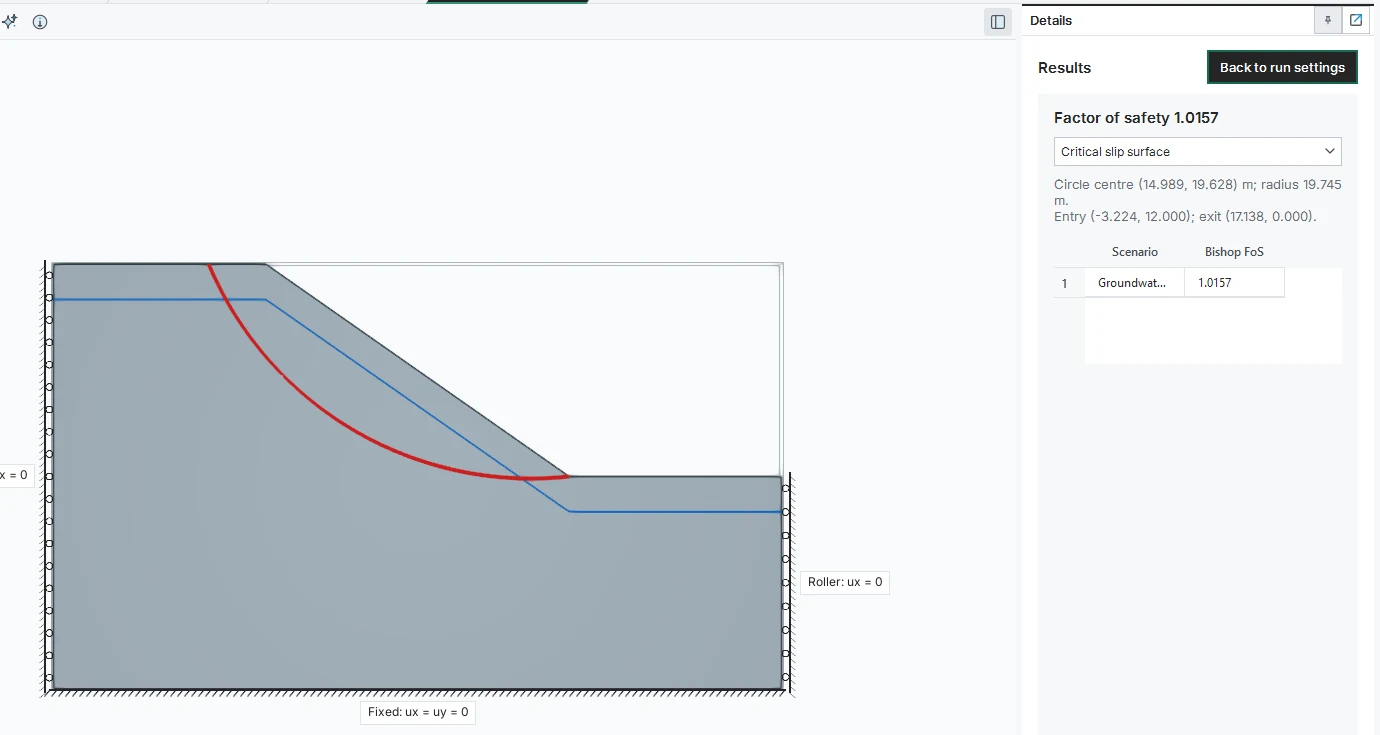
Open the whole Terra window (new tab) Check: Results shows Factor of safety 1.0157. The red line is the critical slip circle: centre (14.989, 19.628) m, radius 19.745 m.
Step 7: Compare a dry slope
Click Conditions in the stage strip and set Water condition to Dry. Then click Run in the stage strip and click Compute. Terra rebuilds the mesh by itself.
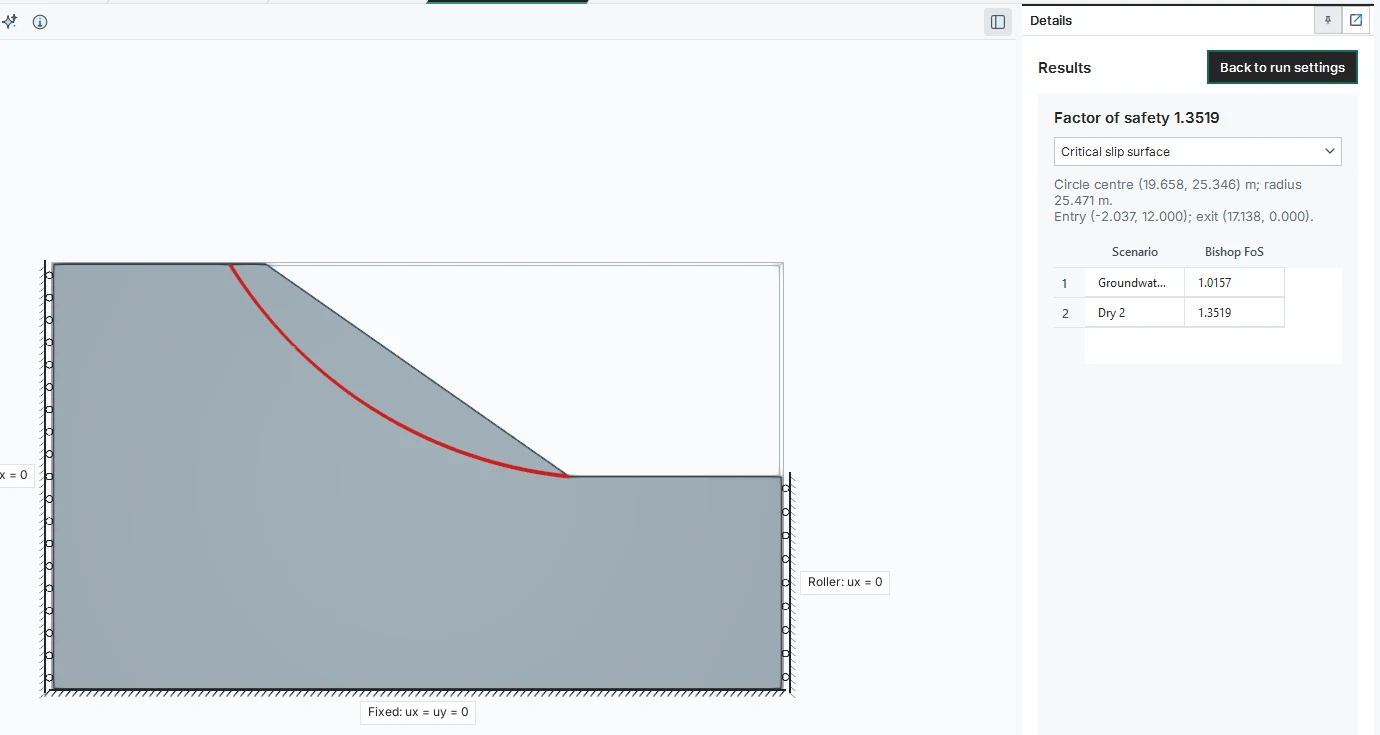
Open the whole Terra window (new tab) Check: Results shows Factor of safety 1.3519, and the table lists both runs: Groundwater 1.0157 and Dry 2 1.3519.
Check your answer
| Result | Your Terra should show |
|---|---|
| Factor of safety, groundwater 2 m below ground | 1.0157 |
| Factor of safety, dry | 1.3519 |
| Mesh | 1,175 nodes and 2,208 triangles |
| Critical circle with groundwater | centre (14.989, 19.628) m, radius 19.745 m |
If your numbers differ
- Check every value in steps 2 to 4. A different height, angle, cohesion, friction angle or water depth gives a different result.
- Make sure you clicked Build slope geometry after typing the height and angle.
- If Compute stops with Assign Fixed base and Roller sides in Conditions before Compute, a support is still Unassigned: set both in step 4.
- If Compute asks for a valid invitation, import your beta licence (in Terra: Help › Licence…) and try again.
Limits of this model
- This is a two-dimensional research preview: the status bar says 2D mechanical research preview · no native parity.
- One homogeneous soil (Mohr-Coulomb, drained, effective stress) and Bishop's simplified method with circular slip surfaces only.
- The groundwater is a water table parallel to the ground surface with hydrostatic pressure below it. Terra does not calculate seepage here.
- The search keeps the lowest factor of safety it finds; that is not proof of the global minimum.